
Safe Educational VR Solution
Everything You Need For Safe, Simple and Effective VR in the Classroom
- Designed for learners of every age
- Enhancing engagement across the curriculum
- Proven to boost learning outcomes
Easy to Use VR for Education
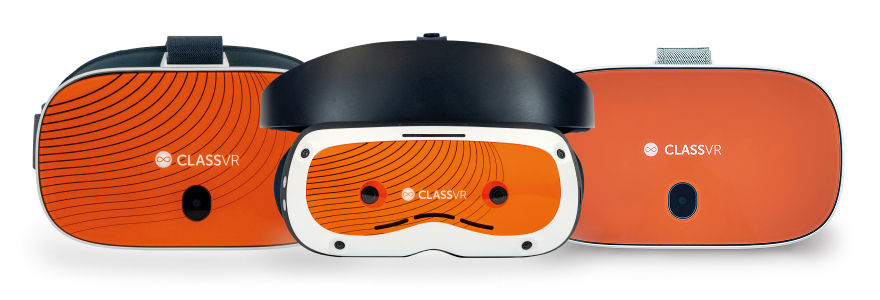
ClassVR offers powerful VR solutions for education, empowering teachers to deliver immersive, hands-on learning experiences that boost student engagement and knowledge retention. Designed specifically for the classroom, ClassVR makes it easy to integrate virtual reality into everyday teaching. Whether you are enriching STEM lessons or exploring world cultures, it transforms the way students learn and grow.
Why Schools Choose ClassVR
- Built for Education
- Simple to Use
- Proven Results
- Globally Trusted
What’s Included in the ClassVR Solution
The ClassVR Solution includes everything schools need to successfully deploy VR and AR into the classroom: award-winning hardware, curriculum-aligned content, intuitive classroom management tools, teacher training, and secure storage and charging – making integration effortless, impactful, and scalable.
Headsets
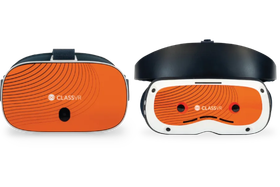
Ergonomically designed VR & AR headsets built specifically for education.

Immersive Content
Access thousands of Australian curriculum-aligned
resources in our Eduverse libraries.
Classroom Management
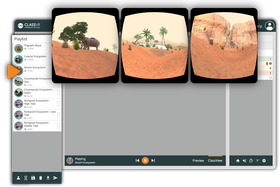
The ClassVR Portal is fully integrated with every ClassVR headset. Giving educators real-time visibility and control.
.png)
Training & Support
Technical and educational teams take teachers from set-up through training and beyond.
.png?updatedAt=1758536654890)
Safe Storage & Charging
Rugged, lockable cases with built-in charging keeps devices safe and lesson-ready.
Device Management
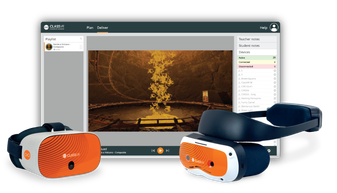
Simplify school IT with ClassVR, centralised device management, remote monitoring and analytics in one platform.
Explore Hands-on Learning with 3D Models
Bring complex ideas to life by letting students see and experience them up close in the palm of their hand.
With ClassVR’s AR cube, learners can hold, rotate, and examine 3D models as if they were real objects in the palm of their hands, making abstract concepts tangible and interactive.
From studying the intricate details of a human heart to viewing ancient artifacts from every angle, 3D models spark curiosity, deepen understanding, and bring subjects to life in ways textbooks never could.
Take Them There with 360° Images and Videos
ClassVR makes it easy to immerse students in the real world through powerful 360° images and videos. From exploring ancient ruins to diving beneath the ocean, learners are transported beyond the classroom and placed right in the middle of the action.
Teachers can also upload 360° content directly to headsets, bringing authentic locations and experiences into the lesson at the click of a button. It’s a simple, powerful way to enrich understanding and create moments students will never forget.
With ClassVR, exploration doesn’t just support learning, it transforms it.
Turn Every Lesson into a Journey of Discovery
Our explorable scenes place students at the heart of learning, surrounded by dynamic environments they can move through, navigate, and explore.
This interactive approach goes beyond simply seeing; it makes them feel present in every moment. By actively engaging with their surroundings, learners build a deeper connection to the subject matter, sparking curiosity and strengthening understanding.
These experiences also foster empathy, creativity, and critical thinking skills that help students grow not just academically, but personally.
Set Students Up for Success Beyond the Classroom
Our Career and Technical Education Content empowers students to think bigger, explore deeper and achieve more.
With Eduverse+, our CareerHub delivers inspiring videos to unlock a world of career opportunities that span diverse industries and professions showcase exciting roles across in-demand job sectors.
Our Xcelerate solution includes EduverseCTE, designed to empower students by teaching essential soft skills to help them enter the workforce, giving students interactive experiences across a variety of high-demand industries, and allowing a greater understanding of everyday working life through immersive job shadowing.
VR solution with Classroom Management tool
Transform teaching with immersive VR content that’s engaging, easy to manage, and fully under teachers control. The ClassVR portal is built for educators, giving real-time visibility and tools to guide, monitor, and enhance every VR lesson.
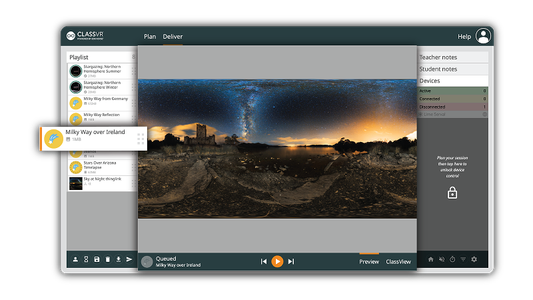
Launch VR Experiences Simultaneously
Send a VR experience to every headset with a single click, or let students explore independently at their own pace.
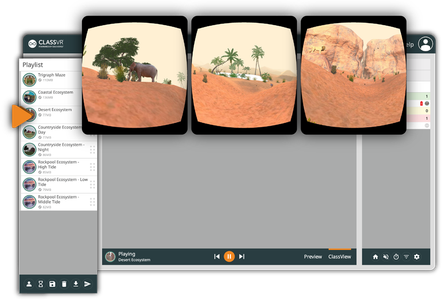
Real-Time Student Monitoring
View student headset activity live with ClassView. Instantly follow along with what every student is exploring, ensuring they stay focused, engaged, and on track throughout the lesson.

Guide and Focus Student Attention
Stay in control with tools like dynamic points of interest and headset locking, keeping students engaged and on task.

Record and Review Student Sessions
Capture student activity in ClassView to review progress and evidence learning.
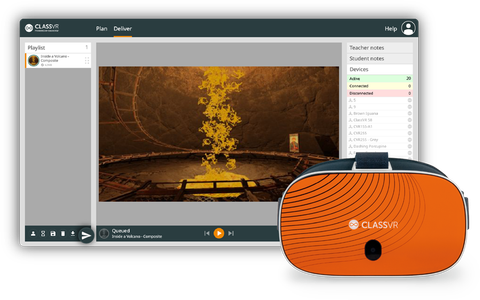
Push Content Instantly to Headsets
Instant content delivery, select your resources and send them to headsets in seconds, keeping your lessons flowing smoothly.

Attention Mode
Pause all headsets instantly to bring attention back to the front of the class.
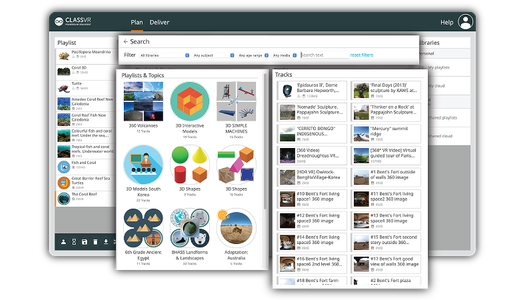
Drag-and-Drop Playlist Creation
Simplify lesson planning, just drag and drop resources from our curriculum-aligned library into custom playlists you can edit, save and launch in seconds.
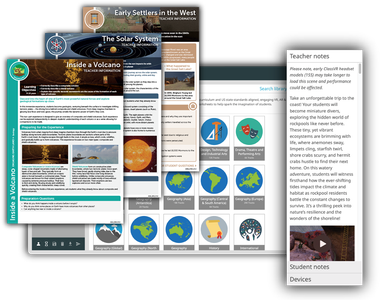
Ready-to-Use Lesson Plans
Our immersive content is paired with curriculum-aligned, ready-to-use lesson plans, complete with objectives, resources, teacher notes, and student prompts, making it easy to integrate into your lessons.
Device Management Designed for Schools
Managing classroom technology shouldn’t be complicated. With ClassVR, device management is simple, secure, and built directly into the platform, no extra tools, no complex integrations, just everything you need in one place.

Controlled Learning Environment
ClassVR headsets are locked down by design, giving students access only to the curated content provided.

Device Analytics
View usage data, battery levels, WiFi status, software versions and headset activity at a glance.

Monitor and Control Devices Remotely
Configure devices, manage settings, rollout firmware updates, reboot, reset or power down devices individually or across your whole fleet.

Student Safety First
No student data is collected, internet access is restricted, and all content is fully teacher-controlled.

Pre-Download Content
Take control of your lessons by caching videos, 3D models, and playlists directly onto headsets ahead of time. With content pre-downloaded, students can jump into VR instantly.

Custom Set up & Classroom Ready
Devices arrive preloaded, preconfigured and linked to your school account.
Why Teachers Pick ClassVR
-

Aisha Kristiansen
Kardinia International College
“It enables us to experience different cultures, habitats and civilisations, and time periods in a way that feels authentic. It helps us be a true international school connected to the world.”
-
Eloise Feltham
Knox Grammar Preparatory School
Australia“ClassVR is a fun, hands-on and interactive platform that allows students to develop and extend their coding skill-base at all levels. It provided students with the opportunity to demonstrate knowledge and understanding at a level appropriate to their needs and is therefore a personalised assessment tool that produced a deeper understanding of content. The impact of utilising Virtual and Augmented Reality in the classroom has contributed to immense student growth in all key learning areas.”
-
Eloise Feltham
St Mark’s Anglican Community School, Australia
“Students love it! They are just so positive about the learning experiences ClassVR brings. From my perspective as a teacher, ClassVR gives students deeper understanding of so many things – especially ones they cannot visit. Take the solar system. We can’t go on a trip to space, but we can take them there with ClassVR.”

.png)
How ClassVR Benefits Learning
Compared to learners taught with more traditional teaching methods, learners using a VR headsets are:

4x
More Focused

4x
Quicker to Retain Knowledge

275%
More Confident in Applying Learnings
*source: PWC
Ready to Explore?
Our global team is here to support you at every step.
Whether you’re curious about the possibilities or ready to see how ClassVR can transform learning in your school, we’re here to help.
Frequently Asked Questions
How does ClassVR work in the classroom?
Create and deliver immersive and engaging lessons with ClassVR’s classroom-ready VR & AR solution
ClassVR headsets provide a safe and secure way for students to explore VR & AR in the classroom with the teacher keeping full control over each device. From a comfortable VR experience using the adjustable head straps to the intuitive and simple to use interface and controls, ClassVR has been designed specifically for students of all ages.
The ClassVR Portal ensures teachers can confidently manage students and add value to lessons when using VR & AR in lessons. Easily search and build VR playlists using the drag and drop functionality, deliver lessons simultaneously and guide students through experiences using set dynamic points of interest. Teachers are always in control and the real-time class view provides full visibility of what and where their students are exploring in the headsets.
The ClassVR Portal contains thousands of pedagogically sound, curriculum-aligned VR & AR resources including content, downloadable lessons plans, guides and worksheets to boost student engagement in every lesson. Teachers can also upload their own content, access the community of educational resources shared by existing ClassVR users and other third-party educational VR & AR content providers.
How do we manage multiple headsets in the classroom?
ClassVR is designed for students and teachers, that’s why we have student and teacher modes.
Student mode allows a balance between student and teacher control. As the teacher, you set the content list of all immersive scenes, then students can individually select the content they want to watch.
Teacher mode allows for full student control. With teacher control, teachers dictates what track is presenting on all VR headsets. Using ClassVR’s ClassView function within the portal, you can monitor what each student is looking at and press start and pause at anytime.
Are there health and safety guidelines?
Click on the link below to read our headset health and safety guidelines
What are the main features of ClassVR headsets?
Virtual reality has many benefits for education. Read about it on our latest blog. HERE
Here are some of the main features that our headsets include that truly bring learning to life:
- Motion control with head tilt,
- Built-in comfort pads and head straps
- Adjustable lens – Xcelerate only
- Easy to clean – wipe or wash at 30
- Built-in stereo speakers
How do teachers control VR screen time?
We recommend that VR sessions last no longer than 15 minutes in a lesson. Short sessions are highly engaging and work best to introduce a topic or reinforce key learning points.
The ClassVR Portal includes a waiting room feature, which teachers can use to notify students when it’s time to remove their headsets. This helps staff manage usage easily and keep lessons on track.