
Inclusion to a core part of how teachers plan, deliver and assess learning. Recent National Center for Education Statistics data shows around 15% of public school students receive services under the Individuals with Disabilities Education Act (IDEA), and the CDC reports that about 1 in 6 children aged 3 to 17 have one or more developmental disabilities. Add multilingual students, students with 504 plans, sensory needs, attention differences and the spread of prior knowledge any class brings, and most U.S. classrooms now contain students with significantly different access points to the same curriculum.
Building an inclusive classroom means designing lessons, environments and routines so more students can take part meaningfully. This guide covers what inclusion looks like in practice, the strategies that hold up across grade levels, and how assistive and immersive technology can support good teaching rather than replace it.
What is an inclusive classroom?
An inclusive classroom is one where students of varied abilities, backgrounds, languages and learning needs are educated together, with the support they need to access and progress through the same curriculum. Physical placement alone does not make a classroom inclusive. A student can sit in a general education room and still be excluded from the learning if their materials, language, pace or expectations have not been adjusted.
Genuine inclusion has four working parts:
- Access: can students reach the content
- Participation: can they actively contribute to lessons
- Belonging: do they feel part of the class community
- Progress: are they making real gains against the same goals
Each of those four matters alongside the others. Strength in one cannot make up for weakness in another.
What inclusion is not
Several common patterns get labeled as inclusion but fall short:
- A student in the room with no adapted materials or accommodations
- A one-off diversity display that does not change how lessons are planned the rest of the year
- A separate “easy” worksheet that lowers the learning goal instead of opening a route to the same one
- Technology added after the lesson has already excluded some students
- Pull-out support that becomes the only route to core content
Each of these has its place in some contexts. On their own, none of them constitute inclusion.
Inclusive education strategies that work in real classrooms
Five inclusive teaching strategies tend to recur in schools that demonstrate consistent practice.
1. Plan with Universal Design for Learning from the start
The UDL framework, developed by CAST, organizes lesson design around three principles: multiple means of engagement, representation, and action and expression. Designing this way at the start tends to be more sustainable than retrofitting accommodations afterward.
2. Offer different ways to access the same content
The same standard might be reached through reading, audio, video, hands-on materials, modeling or immersive content. The aim is not to dilute the curriculum but to provide more than one route into it.
3. Build flexibility into the physical classroom
Seating options, lighting choices, quiet spaces and clear visual schedules support self-regulation for many students, not only those with identified sensory needs. Small, low-cost adjustments often make a measurable difference.
4. Use routines and language that reduce stigma around support
Accommodations are more likely to be used when tools are available to the whole class, when teachers model their use openly, and when language describes how learning is supported rather than singling individual students out.
5. Review what is working
Triangulating between teacher observation, student voice and academic data identifies which adjustments are having impact and which need to change. Inclusion is iterative work, not a one-time decision.
How assistive technology supports accessibility in the classroom
Assistive technology covers any tool that reduces a barrier to learning, from low-tech aids such as pencil grips and visual timers through to software, apps and dedicated devices. Used well, it widens access without lowering expectations.
| Type of tool | Examples | Typically supports |
|---|---|---|
| Text-to-speech | Built-in OS readers, immersive readers | Students decoding below grade level, visual impairments |
| Speech-to-text | Voice typing, dictation features | Students who express ideas more confidently aloud |
| Captions and transcripts | Closed captions on video and audio | Students with hearing differences, multilingual students |
| Translation and read-aloud | Translation tools, immersive readers | Multilingual students working toward English proficiency |
| Screen readers and magnification | Built-in OS accessibility tools | Students with visual impairments |
| Visual timers and organizers | Visual schedules, task organizers, timer apps | Executive function support, transitions |
| Immersive experiences | VR headsets, googles and screen and tablets | Students with physical disabilities or need sensory support |
| Communication tools | AAC apps, communication boards, dedicated devices | Students with complex communication needs |
Many of these features are built into Chromebooks, iPads and Windows devices schools already own, but they are not free of operational considerations in every case. Activation can depend on device settings, district licenses, administrator permissions, staff training and school policy. Some students also benefit from formal evaluation by a speech-language pathologist, occupational therapist or assistive technology specialist before tools are matched to their needs.
Tablet-based AAC (augmentative and alternative communication) apps can support some students, but communication tools should be selected around individual needs and, where appropriate, with specialist input rather than chosen on cost or convenience alone.
Where immersive learning and VR can help
Virtual reality is increasingly used in K-12 settings for purposes that align with inclusive practice. Recent research suggests VR has promise across several areas:
- Building engagement with abstract or distant content
- Supporting structured practice in safe, repeatable environments
- Enabling personalized learning at the student’s own pace
- Providing safe rehearsal of social situations
- Offering shared reference points for content students could not otherwise access
A 2024 systematic review in Multimedia Tools and Applications examined 37 papers on VR, AR and empathy and reported that 59.46% found statistically significant results in favor of immersive interventions. The same review noted limits, including small sample sizes and a reliance on self-reported measures.
Impact in any classroom depends on teacher training, accessibility considerations, cost, careful implementation and a deliberate match between the tool and the student’s need. VR is not a replacement for direct instruction or skilled staff. Where it adds value is in shared experiences students can return to in discussion, calming environments for sensory regulation, and rehearsal of situations such as science procedures, job interviews or public speaking before students attempt them live. Our resource on supporting additional educational needs with VR covers specific use cases in greater depth.
Special education tools should support the teaching goal
The most useful frame for selecting any tool, assistive or otherwise, is to start with the barrier and work backward to the support that addresses it.
| Identified barrier | Reasonable starting points |
|---|---|
| Reading | Read-aloud tools, text-to-speech, pre-reading vocabulary support |
| Sensory overload | Environmental adjustments and regulation tools, before any new technology |
| Background knowledge | Visuals, models, video or immersive content to build shared context |
| Communication | AAC or communication supports selected with specialist input |
| Anxiety in social situations | Scripts, role-play, structured rehearsal or VR-based scenarios for safe practice |
Tools chosen this way are more likely to be used consistently and more likely to produce outcomes that show up in observation and progress data.
How ClassVR fits into an inclusive classroom
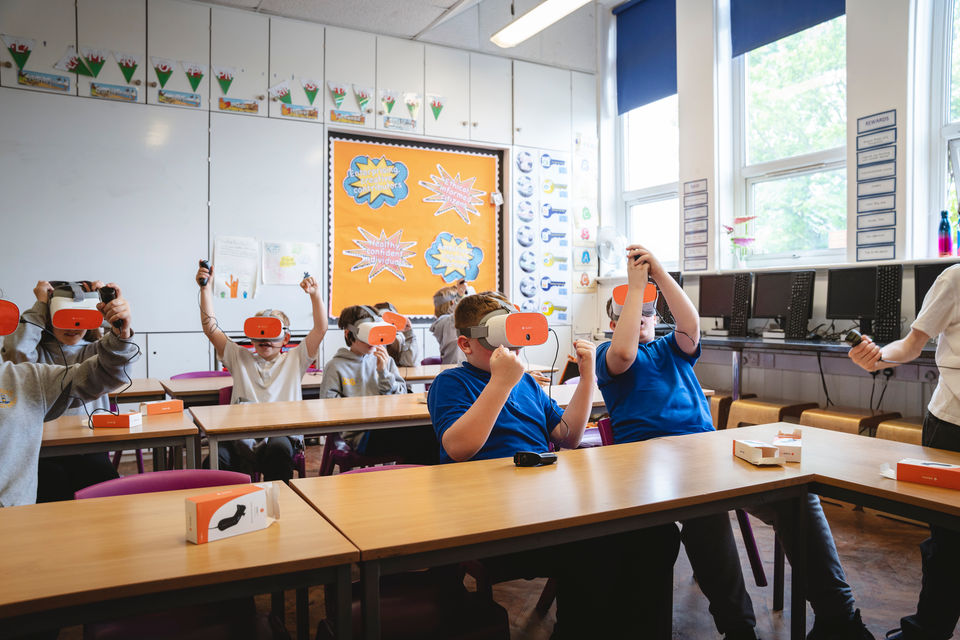
ClassVR is one tool that schools use within a broader inclusive teaching approach. EduverseTHRIVE is the content set focused on emotional regulation, sensory support, wellbeing, perspective-taking and inclusion. It includes:
- Calming environments for sensory regulation
- Social skills scenarios for structured practice
- Self-regulation content students can return to
- Perspective-taking content on diversity and neurodiversity
Teacher control is part of how the platform fits a classroom context. Through the ClassVR Portal, staff can choose which content reaches which students, pace and pause sessions, and manage the experience as part of the wider lesson. The headsets have classroom-friendly features such as adjustable straps, wipeable hardware and controlled content access.
VR is not a replacement for individual education programs or specialist services. It is one option within a wider toolkit that also includes assistive technology, environmental adjustments, curriculum modifications and team-based support.
Where to start
Sustainable inclusive change rarely happens through wholesale program rollouts. A more reliable pattern is to work in short cycles:
- Identify one barrier students are encountering
- Choose one strategy or tool that addresses it
- Trial it for around two weeks
- Review the impact using observation, student voice and any available progress data
Teachers and inclusion specialists who work this way build a clearer picture of what shifts outcomes for their students, and avoid investing in tools that go unused or training that does not change classroom practice.
Summary
Inclusion is not a poster, a seating plan or a one-off initiative. It is the daily design of lessons, materials, routines and tools so that more students can access the same ambitious curriculum. Universal design, flexible access, considered use of assistive technology and regular progress review give teachers a practical foundation. Immersive content and VR can support that foundation when chosen for a defined purpose.
Explore EduverseTHRIVE or book a free demo to see how ClassVR can support inclusive classroom practice in your school.