

The Leading Virtual Reality Solution for Districts
Driving Trust-Wide Innovation and Impact Through Virtual Reality
As Seen In
Transforming Learning Across Your District with ClassVR
Delivering innovation and consistency across a multi-academy trust can be challenging. ClassVR helps make it easier. As the leading VR/AR solution built specifically for education, ClassVR provides a scalable platform that empowers every school in your trust with immersive, curriculum-aligned learning. From STEM to the arts, history to global cultures, ClassVR ensures all students, no matter which academy they attend, can benefit from engaging, hands-on experiences that enhance engagement, knowledge retention, and confidence. With shared training, centralised management, and dedicated support, ClassVR helps trusts raise standards and inspire learning at scale.
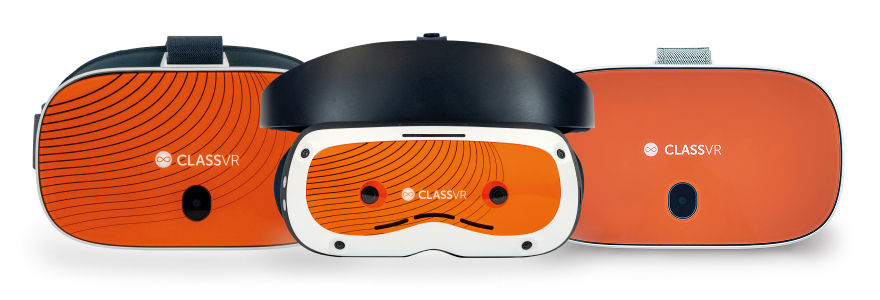
Why Choose ClassVR
- Built for Education
- Simple to Use
- Proven Results
- Globally Trusted
What’s Included in the ClassVR Solution
The ClassVR Solution includes everything schools need to successfully deploy VR and AR into the classroom: award-winning hardware, curriculum-aligned content, intuitive classroom management tools, teacher training, and secure storage and charging – making integration effortless, impactful, and scalable
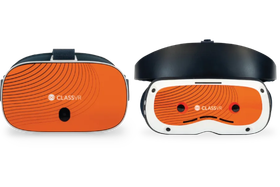
Headsets
Ergonomically designed VR & AR headsets built specifically for education.

Immersive Content
Access thousands of standards-aligned
resources in our Eduverse libraries.
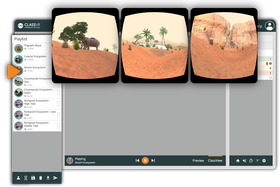
Classroom Management
The ClassVR Portal is fully integrated with every ClassVR headset. Giving educators real-time visibility and control.
.png)
Training & Support
Technical and educational teams take teachers from set-up through training and beyond.
.png?updatedAt=1758536654890)
Safe Storage & Charging
Rugged, lockable cases with built-in charging keeps devices safe and lesson-ready.
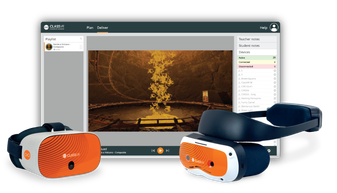
Device Management
Simplify school IT with ClassVR, centralized device management, remote monitoring and analytics in one platform.
How ClassVR Benefits Learning
Compared to learners taught with more traditional teaching methods, learners using a VR headsets are:

4x
More Focused

4x
Quicker to Retain Knowledge

275%
More Confident in Applying Learnings
*source: PwC
Trusted by Schools Nationwide
.png?updatedAt=1774541388388)
Allentown School District – Alabama
See Allentown support elementary students across its 24 schools driving support to Student learning, providing safe spaces for regulation.
.png)
Barbers Hill ISD – Texas
A district wide vision for Immersive learning. Barbers ISD serves provided 7000 students with VR learning experience to drive english, math and social student engagement.
.png)
Montgomery PS – Alabama
Discover how Montgomery Public Schools in Alabama is engaging students in STEM and literacy with ClassVR.
.png?updatedAt=1773422686860)
Used in Every State Nation Wide
ClassVR is supporting teachers in across the country to create impactful, immersive learning experiences. With a country wide partner network and local teams, we are here to support schools every step of the way.
Ready to Explore?
Our global team is here to guide you every step of the way. Whether you have
questions or want to explore how ClassVR can transform learning, reach out today by
contact form, email, or phone and start your immersive learning journey with us.

Frequently Asked Questions
What do we need to get started with VR in our school?
Getting started with ClassVR is simple. All you need is a set of ClassVR headsets, content subscription and a reliable Wi-Fi connection.
The ClassVR solution includes headsets that are classroom-ready, curriculum-aligned content, lesson resources, and intuitive classroom management tools.
We provide comprehensive training to help you set up your headsets, use them with confidence, and seamlessly integrate VR into your lessons.
Do teachers need technical experience to use the classroom management portal?
Not at all! The ClassVR portal was designed by education specialists specifically for teachers. It’s intuitive and easy to use, giving you full control over how students interact with their headsets.
Learn more about how the ClassVR Portal works here.
Why is VR good for education?
Virtual reality offers a range of benefits, from boosting knowledge retention and supporting learning outcomes to enhancing classroom engagement.
Immersive experiences, such as walking on the moon or exploring faraway places, spark curiosity and encourage students to ask questions; helping them build a deeper understanding of their subject. VR can also make abstract ideas feel tangible, from visualising the structure of an atom to exploring the layers of the Earth, turning challenging concepts into experiences students can understand more easily.
VR also provides powerful support for SEND learners. It can build confidence by preparing students for real-world scenarios, such as visiting the doctor or using public transport. Virtual safe spaces can also provide a calm environment where students de-escalate heightened emotions and return to learning.
How is virtual reality used in schools?
Every day, more and more schools across the globe are using virtual reality within their lessons to make learning more engaging and increase attention and focus within the classroom. VR provides different ways to learn from, immersive environments, hands-on learning, and interactive simulations making complex subjects easy to understand and unforgettable to remember.
ClassVR provides hundreds of thousands of immersive resources to support teaching across the curriculum. From Math, ELA to Humanities and Geography, ClassVR resources can be used to drive lesson success. View our content offering here
Here are some examples of how schools are using virtual reality:
- Explore hands-on learning with 3D models – bring complex ideas to life by letting students see and experience them up close – right in the palm of their hand.
- Take students on virtual field trips with 360° images and videos – from exploring ancient ruins to diving beneath the ocean, students are transported beyond the classroom and placed right in the middle of the action.
- Turn every lesson into a journey of discovery – this interactive approach goes beyond simply seeing; it makes them feel present in every moment.
- Career training – deliver inspiring videos to unlock a world of career opportunities that span diverse industries and professions, showcasing exciting roles.
What support is available after purchase?
Our dedicated team is here to support you throughout your entire journey with ClassVR.
To help teachers feel confident in the classroom, we provide online training made up of bite-sized videos. This flexible format lets you learn at your own pace and revisit materials whenever you need.
Our Education Specialists are also on hand to provide personalised guidance, answer questions, and make sure you feel supported every step of the way.
Is the content curriculum-aligned?
Yes. All ClassVR content is curriculum-aligned.
Our team of Education Specialists create and curate content that reflects classroom learning and provide teacher and student notes to guide learning. These resources make it easier to plan and deliver lessons with confidence.
Which VR solution is best for education?
When choosing a virtual reality solution for education, it’s important to consider factors such as ease of classroom use, curriculum alignment, and overall value for schools.
Here’s how the main options compare:
- ClassVR – the leading VR headset designed specifically for education. It combines classroom-ready hardware with thousands of curriculum-aligned resources, all managed through the ClassVR portal. Teachers can plan lessons, send content to devices, monitor what students are seeing, and even create or upload their own content. ClassVR is offered in tailored packages to meet the needs of schools.
- Meta Quest – offers strong image quality and interactive features, and can be bought individually or in bundles. However, it’s primarily designed for gaming, so teachers often struggle to manage multiple devices in a classroom. Content is not included, so schools need to download and pay for individual apps separately.
- HTC Vive – A powerful VR system created for gaming and business. While it can be used in schools, setup can be complex, and the education-specific content is limited compared to other options.
Here are some key considerations when choosing virtual reality for your school:
- Curriculum-alignment
- Budget
- Content availability
- Safety
- Comfort
- Set up and storage